
A peeled sticker effect is a great effect to add to any design. Freom band logos to web design a peeled sticker effect can add a unique touch to any design.
Here’s how to do a basic peeled sticker effect in Photoshop.
First we will start off with a sticker looking object, for this tutorial I will be using text for our peeled sticker effect. (I’m using the Anja Eliane font).

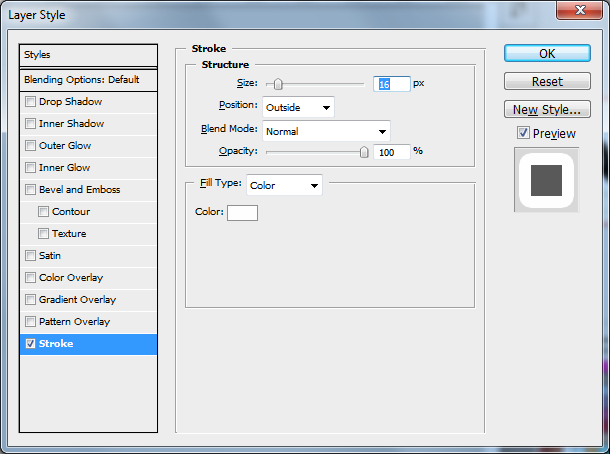
Next add a stroke to it for the border of the sticker.
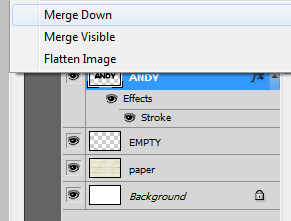
You will have to rasterize the text then create a new layer and merge the text layer down so you can get a flat version of the graphic. Using the rasterize effect works on as many layers as you want so you can use this effect on any pre existing Photoshop document.
Now that you have the merged layer you will need to pick what part you want to appear folded over (just do this by using the polygonal lasso).
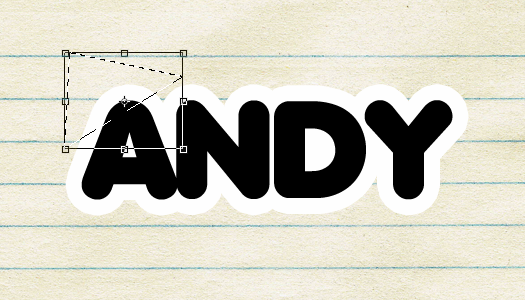
After you have the part of the sticker selected that you want to flip you will need to right click it and select “layer via cut“. Once you have the cut in a new layer select it again and free transform it to change the height and width to -100% of what they are now, which flips them vertically and horizontally. Once it’s flipped place it where you deleted it so it appears as if it’s folded over.

Next you will need to remove the original black text part, by selecting the layer (ctrl+click on layer thumbnail) and fill the layer with any color you want (I used an off white for mine). I had to do this step a couple of times to fully get the original color of the text out.

Add a quick shadow to the fold and select the layer, once selected go to Layer>Layer Style>Creat Layers, this will make the shadow a layer itself where you can delete the area not on the sticker.

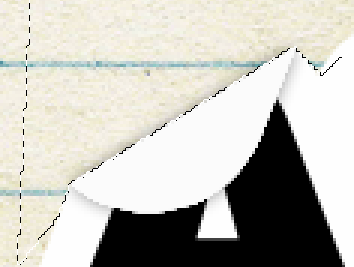
After the shadow looks nice go back to the layer of the fold and select the burn tool, make the range “Highlights” and put the exposure down (to about 4%). Draw a faint line on the fold so it appears to have some lighting effects, and that’s it! you have a nice simple peeling sticker effect.

There are plenty of different things you can try with this, including text, rounded “stickers”, and plenty more. Note that my rounded sticker was textured with this paper texture.

Here’s some inspiration, including Brad Sucks website and the Little Big Planet cover art.


Excellent tutorial! Thanks, @someguy9:disqus.
This is really cool! Love the sticker with a peeling effect. Thank you so much for sharing. 🙂
Thank you, but I’m having a problem with step two. Dealing with the 100% width and height. Mine is already set to 100% and it doesn’t flip when I try to change it to another number. Could you help me out?
Are you doing negative 100%? (-100%) when you do a negative value you flips it, or you can right click on it and flip from there
Thank u so much!
I m looking for page peel off effect like a book or magazine.
I meant not photoshop, flash? or any other easy applicable effect like this.
Help me!
thankz, sk
Thanks for the straight forward tutorial, and 10x for helping me out and clearing my doubts along the way on IM. Keep up the awesome work.
May be you can also try creating screen-casts for longer tutorials.
By the way, here is my attempt of text peel effect: http://imgur.com/KAfMT
Thanks once again!
Really cool tutorials! The sticker peel effect is very web 2.0, fits right into my designs